
SSP Login 2025-26: The State Scholarship Portal is the single official platform where students complete e-Attestation, verify Aadhaar details, and submit their applications online.
From school students (Classes 1–10) to college students (Class 11 and above), everyone must log in to SSP to stay eligible for scholarship benefits. This guide briefly explains how to use SSP Login 2025–26 to complete e-Attestation and apply without confusion.
Quick summary, if you’re short on time:
- Collect your documents first. Keep Aadhaar, SATS ID (for school students), income and caste certificates, bank passbook, marks card, and fee receipt ready.
- Complete Aadhaar e-KYC immediately. This step verifies your identity and is required before applying.
- Pre-Matric students must enter their SATS ID so the portal can automatically fetch school details.
- Post-Matric students should verify their academic and college information shown in the portal before continuing.
- Review the entire application carefully before final submission.
- Submit the form and download the acknowledgement receipt, then save your Application ID for tracking later.

Essential Documents Checklist
Before you visit the SSP Karnataka Scholarship 2025 portal, gather these documents. Missing documents are the main reason for rejection.
- Aadhaar Card: Student’s and Parent’s Aadhaar.
- SATS ID: (For Pre-Matric) Available from your school headmaster.
- Income and Caste Certificate
- Bank Passbook: You must seed the account with Aadhaar (NPCI-mapped).
- Marks Card: Previous year’s result.
- Fee Receipt: For the current academic year (Post-Matric).
- E-Attestation ID: (For Post-Matric only) Required for students in private colleges or hostels.
- Study Certificate / Bonafide Certificate.
How to Apply for the SSP Pre-Matric Scholarship (Class 1 to 10)
After you create your account, use these steps to apply for the SSP Pre-Matric Scholarship for the 2025-26 academic year.If you don’t have an account yet, create your SSP scholarship account.
Step 1: Log in to your dashboard
- Visit the SSP Karnataka homepage and click on the “SSP Login” button.
- Enter your User ID (SSP ID) and password.
- Type the CAPTCHA code shown on the screen and click “Login.”

Step 2: Complete mandatory e-KYC
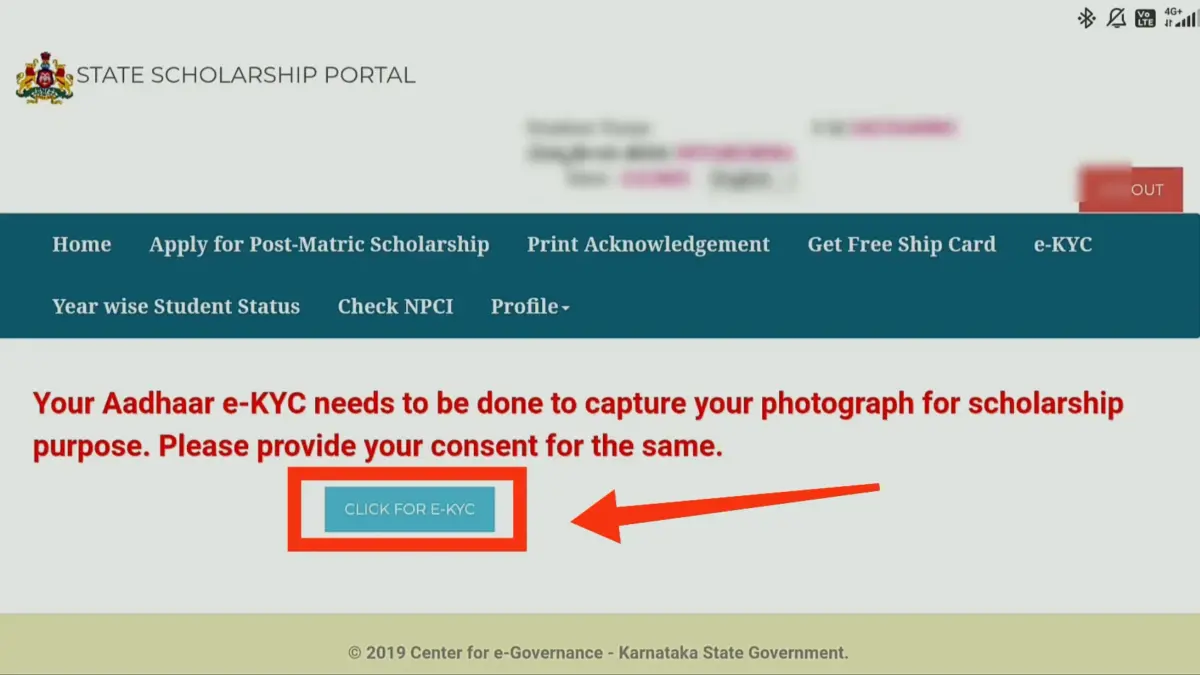
- Before applying, you must verify your Aadhaar. Click on the “e-KYC” link on your dashboard.
Step 3: Fetch Student Details (SATS)
- Go back to the home tab and click “Apply for Pre-Matric Scholarship.”
- Enter your SATS ID (Student Achievement Tracking System ID) in the required field.
- Click “Get Data.” The system will access your name, school, and date of birth details from its database.

Note: You cannot change these details. They come straight from your school records.
Step 4: Enter Parent & Caste Details
- Parent’s Occupation: Select “Yes” only if parents are engaged in unclean occupations; otherwise, select “No.”

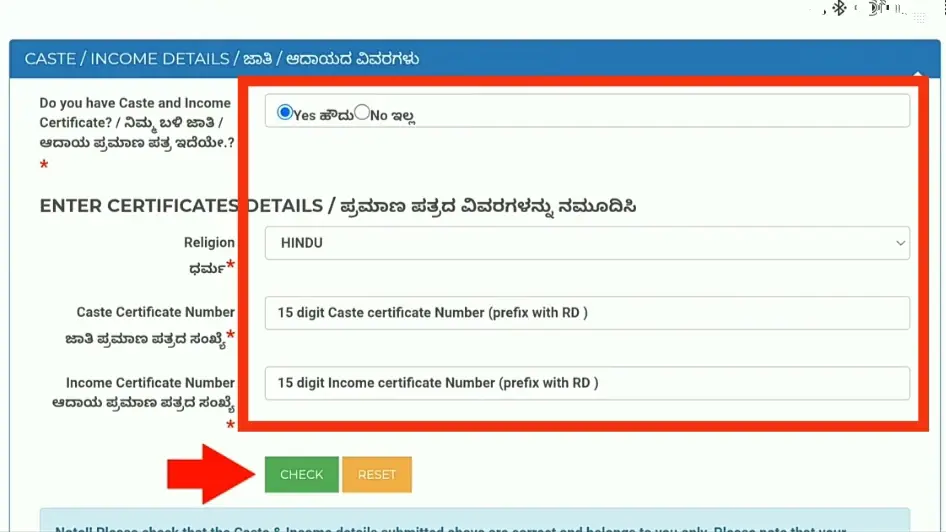
- Select “Yes” when asked if you have a caste/income certificate.
- Enter your religion, caste certificate RD number, and income certificate RD number.
- Click the “Check” button. The portal will confirm your certificate data immediately after submission.
Step 5: Add Personal and Hostel Details
- Disability Status: If the student has a disability Select “Yes” or student does not have any disability. Simply select “No” and continue.
- Select your district and taluk, and enter your current PIN code.
- Confirm you are a domicile of Karnataka by selecting “Yes.”
- If you’re in a government-funded hostel, fill in the “Hostel Details” section.

Step 6: Final Submission
- Click “Next” to view a preview of your full application.
- Inspect every detail in depth. If everything is correct, click “Final Submit.”
- You will see an acknowledgment message. Save your Application ID for future reference.
How to Apply for SSP Post-Matric Scholarship (PUC, Diploma, Degree)
If you plan to study after Class 10, such as in PUC, ITI, Diploma, Engineering, or Degree, here’s how to apply for the SSP Karnataka Post-Matric Scholarship.
Step 1: Access Your Student Dashboard
- Open your browser and search for “SSP Login” or visit the official website directly.
- Click on the “Student Login” link on the homepage.
- Enter your SSP ID (user ID) and password.
- Enter the CAPTCHA code. Then, click “Student Login” to enter your dashboard.
Step 2: Authenticate with Aadhaar e-KYC.
- You must verify your identity first. Click on the “e-KYC” tab inside your dashboard.
Step 3: Verify Academic and Personal Details
- Click on “Apply for Post-Matric Scholarship” for the current academic year.
- Review your basic student details, as the system obtains them from SSLC/PUC records. If they are correct, click “Save & Proceed.”
- Enter your location details: Choose your Taluk and Assembly Constituency. Then, enter your PIN Code.
- Confirm you are a domicile of Karnataka by selecting “Yes.”

Step 4: Confirm Caste and Income
- Select “Yes” to confirm you have a caste/income certificate.
- Choose your Religion from the list.
- Type your Caste Certificate RD number and your Income Certificate RD Number just as they are on your documents.
- Click the “Check” button. The system will instantly verify and fetch your certificate data.
- Click “Save & Proceed” once verified.

Step 5: Confirm Course & Admission Data
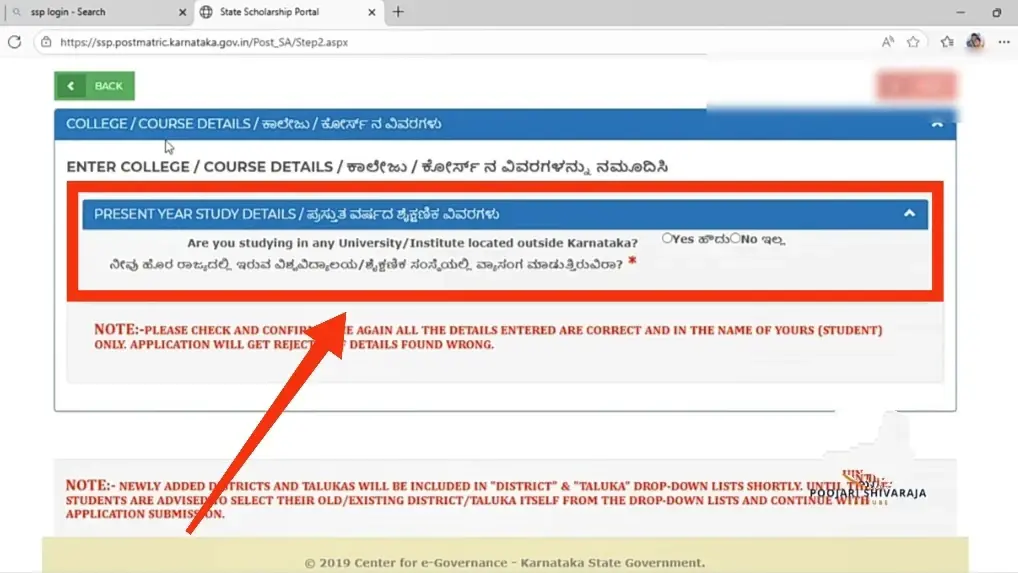
- The system often gets your college and course info straight from your university or board. Verify that the college and course displayed are correct.
- Enter your Course Start Date (the date your classes began).
- Select your Mode of Admission (e.g., Government Quota, Management Quota, etc.).
- Click “Save & Proceed”.
Step 6: Final Review and Submission
- Indicate whether you are a Day Scholar or Hosteller.
- Click “Next” to see a full preview of your application.
- Review all details carefully. If everything is accurate, check the final declaration box and click “Submit”.

- Important: Click “Print Acknowledgement” to download the PDF receipt. Keep this file safe for future reference.
Frequently Asked Questions (FAQs)
A: Use the “Forgot User ID” option on the login page. You will need to enter your registered mobile number to retrieve it via SMS.
A: This means the government has initiated the transfer. It may take 7–15 working days to reflect in your account. Ensure your bank account is active.
A: No, once submitted, you cannot edit the application yourself. You must visit your Taluk or District Verification Officer for corrections.
Thanks you
I appreciate your thanks! 😊 Your feedback means a lot to us. If you have any doubts or need more guidance regarding SSP Scholarship, please comment below. We’re here to help! 👍
Kashinath
Kurubar hostel vinyaka badvane mandya
I have submitted my ssp application on September and it was approved but now it’s showing to do it again
SSP login
I have submitted my ssp but my verification status is still pending from past last year
Don’t show the student status
The marks entry pdf is not shown on the my login website what I do?
When will ddo approve scholarship
ನಾನುಎಸ್ ಎಲ್ ಸಿ ಯಲ್ಲಿ ಉತ್ತಮ ಅಂಕಗಳನ್ನು ಗಳಿಸಿದ್ದು ನನ್ನ ಮುಂದಿನ ವಿದ್ಯಾಭ್ಯಾಸವನ್ನು ಮುಂದುವರಿಸಲು ಆರ್ಥಿಕ ನೆರವಿನ ಅಗತ್ಯವಿದೆ ಈ ಸ್ಕಾಲರ್ಶಿಪ್ ನನ್ನ ಶೈಕ್ಷಣಿಕ ಗುರಿಗಳನ್ನು ತಲುಪಲು ಸಹಕಾರಿ ಅಗಲಿದೆ ದಯವಿಟ್ಟು ನನ್ನ ಅರ್ಜಿಯನ್ನು ಪರಿಗಣಿಸಿ
Hi iam vikas ingalagavi
We want to apply ssp
I have submitted my ssp but my verification status is still pending from past last year
ನಾನು 9ನೇ ತರಗತಿಯಲ್ಲಿ ಉತ್ತಮ ಅಂಕಗಳನ್ನು ಗಳಿಸಿದ್ದು ನನ್ನ ಮುಂದಿನ ವಿದ್ಯಾಭ್ಯಾಸವನ್ನು ಮುಂದುವರಿಸಲು ಆರ್ಥಿಕ ನೆರವಿನ ಅಗತ್ಯವಿದೆ ಈ ಸ್ಕಾಲರ್ಶಿಪ್ ನನ್ನ ಶೈಕ್ಷಣಿಕ ಗುರಿಗಳನ್ನು ತಲುಪಲು ಸಹಕಾರಿ ಅಗಲಿದೆ ದಯವಿಟ್ಟು ನನ್ನ ಅರ್ಜಿಯನ್ನು ಪರಿಗಣಿಸಿ