
Your SSP application looks complete but it still isn’t moving. In many cases, the reason isn’t missing documents or a technical error. It’s E-KYC or e-Attestation. These two verification steps confuse thousands of applicants every year because the portal never really explains what they’re checking or when they need to be completed. Before you spend hours trying to figure out what’s wrong, here’s what E-KYC and e-Attestation actually do, why they matter, and how to finish both without getting stuck.
TL;DR
Here are the key things you need to do:
- Complete Aadhaar E-KYC first. Log in to SSP, enter your Aadhaar number, verify the OTP, and confirm your photo.
- Don’t skip E-KYC. Without it, you cannot submit your scholarship application or receive DBT payment.
- Only Post-Matric students need e-Attestation. Pre-Matric students usually don’t have to do this step.
- Upload the main documents clearly: bonafide certificate, previous marks card, and current fee receipt.
- Check your document status after uploading. It will show Pending, Approved, or Rejected until your college verifies it.
- If a document is rejected, fix the issue and upload it again.
- Save your e-Attestation ID after approval. You have to enter this ID in your main SSP scholarship application.
What is E-KYC and Why You Need It?
E-KYC is an Aadhaar-based step that links the student’s identity with the scholarship system. The government uses it to confirm who the student is and to take a photo. This photo is saved in the scholarship records. It helps identify all students clearly, both pre-matric and post-matric.
This step is very important because the scholarship money is sent through the Direct Benefit Transfer (DBT) system. The amount goes straight to the student’s bank account. E-KYC makes sure the money reaches the right person and helps stop fake applications. You must finish E-KYC before you can continue with any other step of the scholarship application.
How to Complete SSP Scholarship E-KYC: Step-by-Step Process
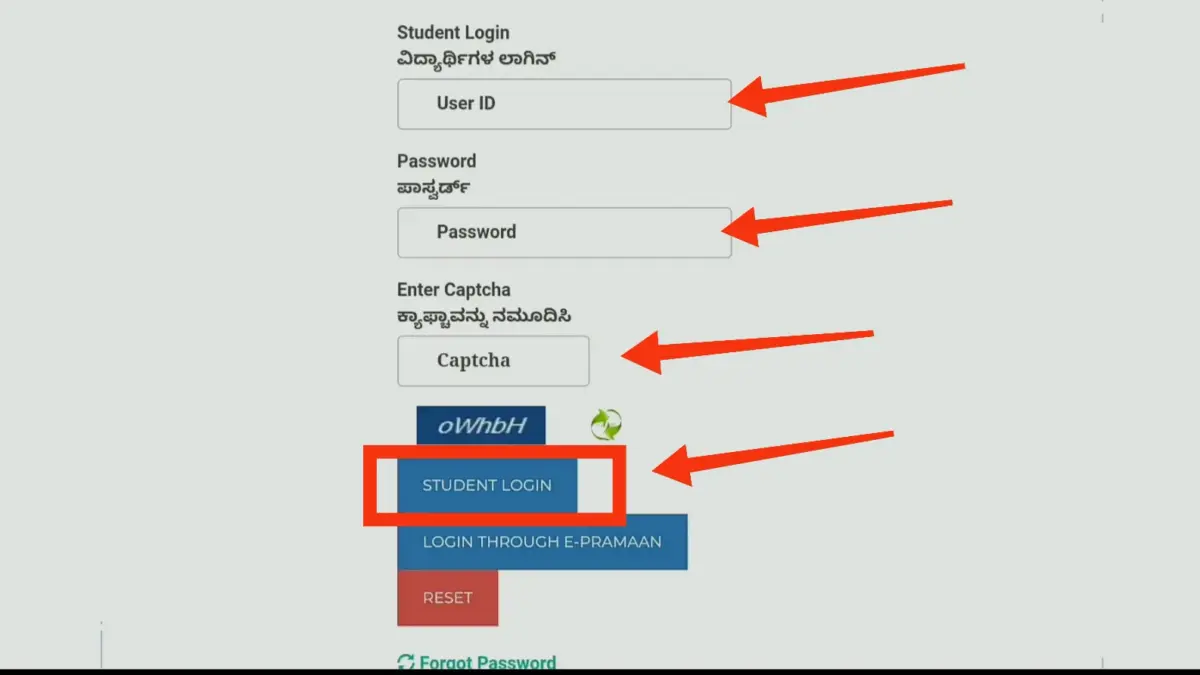
Step 1: Log in to the SSP portal
Enter your login credentials — your SSP ID, name as it appears in your Aadhaar, and your gender.
Step 2: Look for the E-KYC message
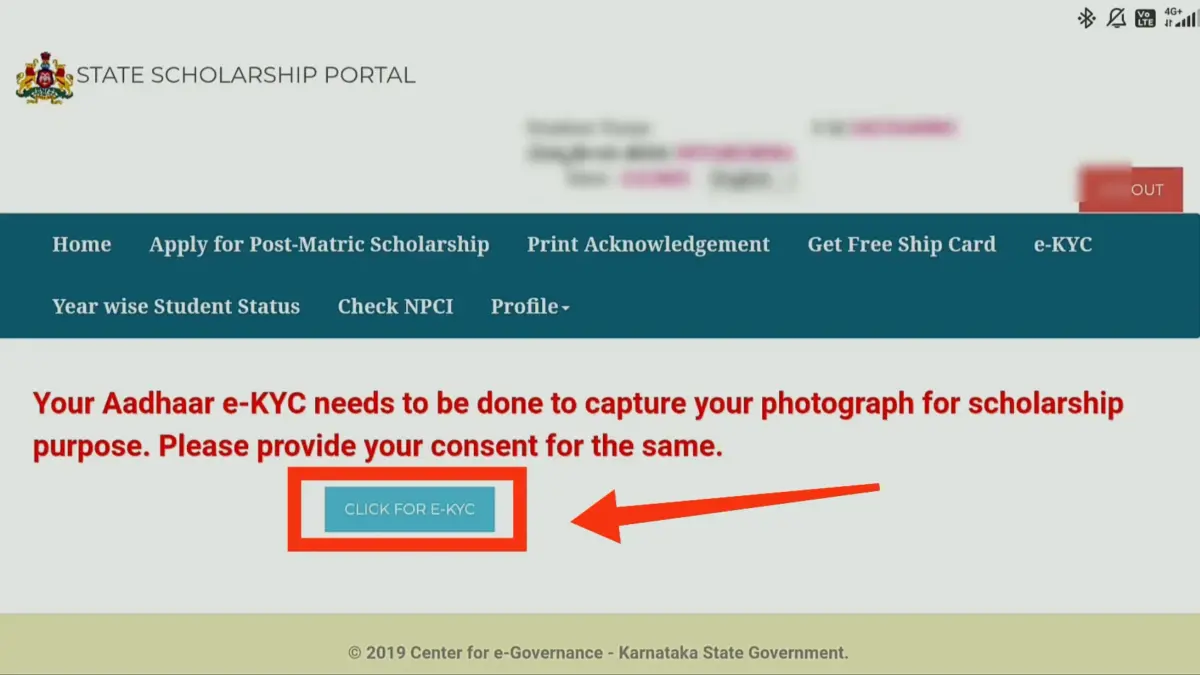
Once you log in, a message will pop up saying: “You need to complete your Aadhaar E-KYC to capture your photograph for scholarship purposes.” Simply click the button that says ‘Click for E-KYC’.
If you don’t see the popup, just look for the E-KYC option in the main menu.
Step 3: Verify Your Aadhaar
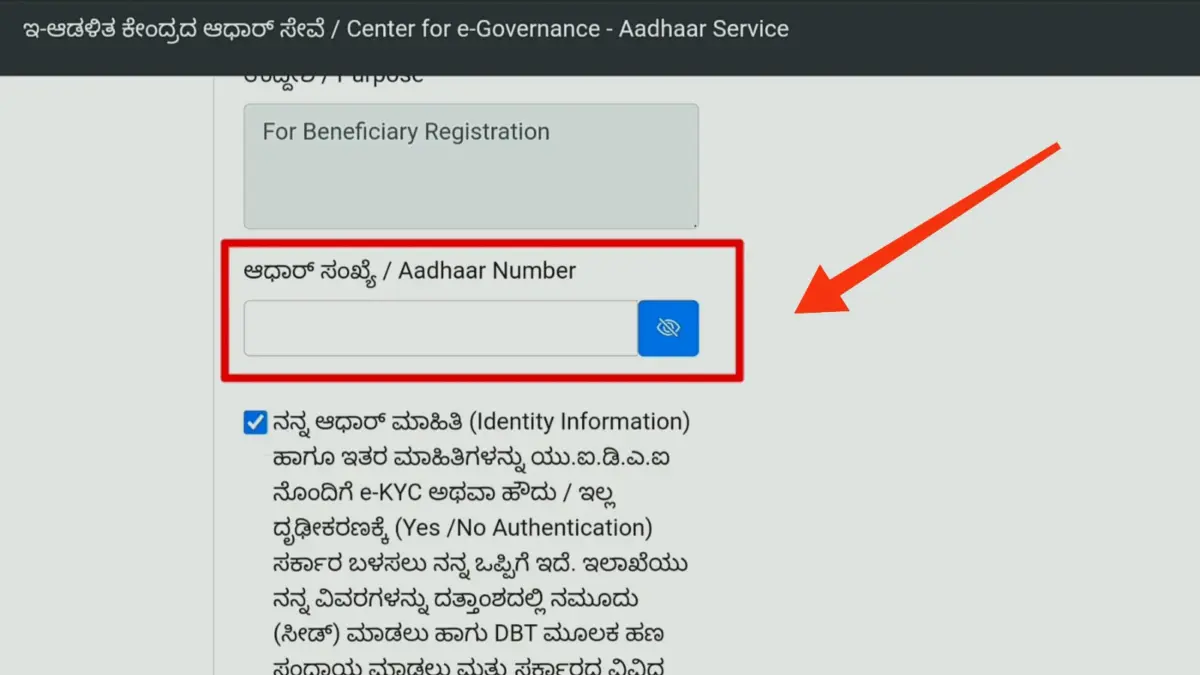
You will be taken to the ‘Centre for e-Governance’ page. Type in your Aadhaar number and click Submit. You will get an OTP on the mobile number linked to your Aadhaar. Enter that OTP to confirm it is you.
Step 4: Confirm Your Photograph
Your Aadhaar photo will appear on the screen. Check if the photo is clear and looks like you. If it is correct, tick “Displayed Photo is Correct” and click Save. Your E-KYC is now complete.
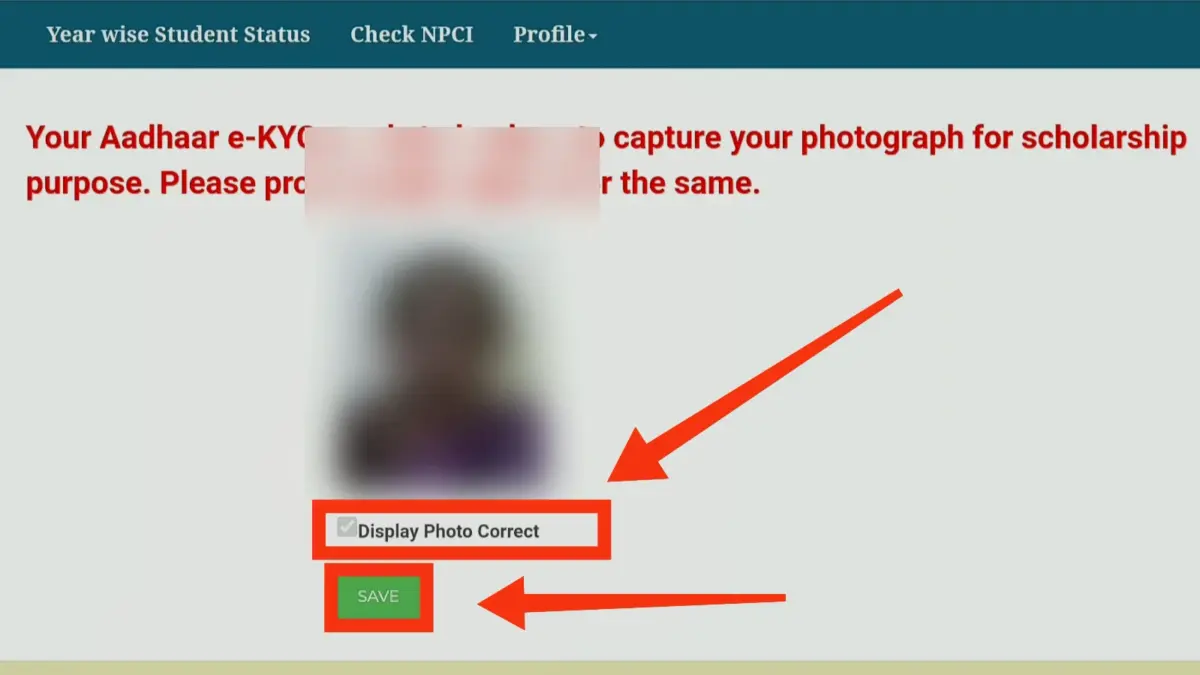
If the photo looks old or does not match you, visit your nearest Taluk office. Update your Aadhaar details before applying for the scholarship.
What is SSP Scholarship E-Attestation?
E-Attestation basically means submitting your academic papers online for verification. The Nodal Officer (the person in charge of scholarships at your college) will check your documents to make sure they are genuine and follow the rules.
Important Note: If you are studying PUC, ITI, GTTC, or any Diploma course (like Polytechnic, Nursing, Pharmacy, etc.), you do not need to do this E-Attestation.
Documents You’ll Need to E-Attestation
Here is the list of document names for SSP Post-Matric e-Attestation:
Mandatory Documents
- Bonafide Certificate (Study Certificate)
- Previous Year Marks Card
- Fee Receipt (Current Academic Year)
Conditional Documents (If applicable)
- SSLC / 10th Marks Card (Only for CBSE/ICSE or non-Karnataka boards)
- Hostel Declaration Certificate (For private hostel residents)
- Salary Certificate (For SC/ST students with family income ₹2.5L–₹10L)
- Defence Certificate (For children of defence personnel)
Important: E-Attestation is mandatory only for post-matric students. If you’re in Pre-Matric (Classes 1-10), you don’t need to complete this step.
How to Upload and E-Attest Your Documents on SSP portal?
Step 1: Access the E-Attestation Portal
Go to eattestation.ssp.karnataka.gov.in.
Log in using:
- Your SSP ID
- Your name (same as Aadhaar)
- Gender
- Captcha code
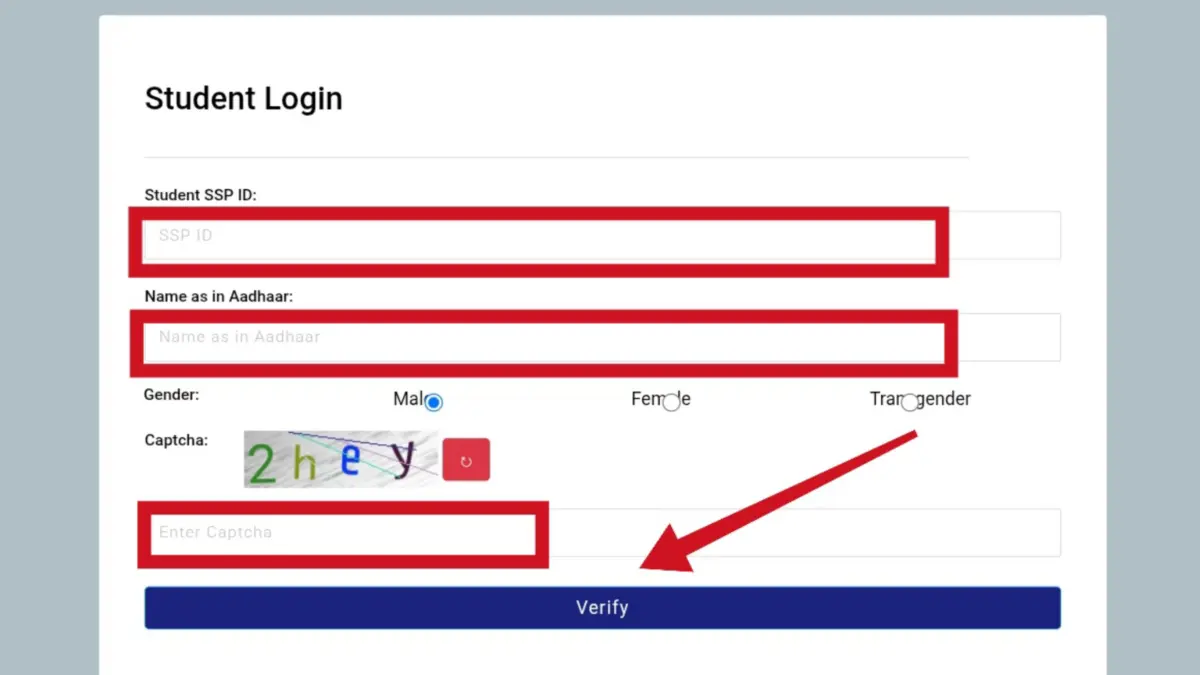
This will take you to the SSP e-Attestation page.
Step 2: Confirm Your Student Details
After login, your details will appear on the screen. These details come directly from your SSP application. You will see:
- Student ID
- Name
- District
- College
- Course
- Other basic details
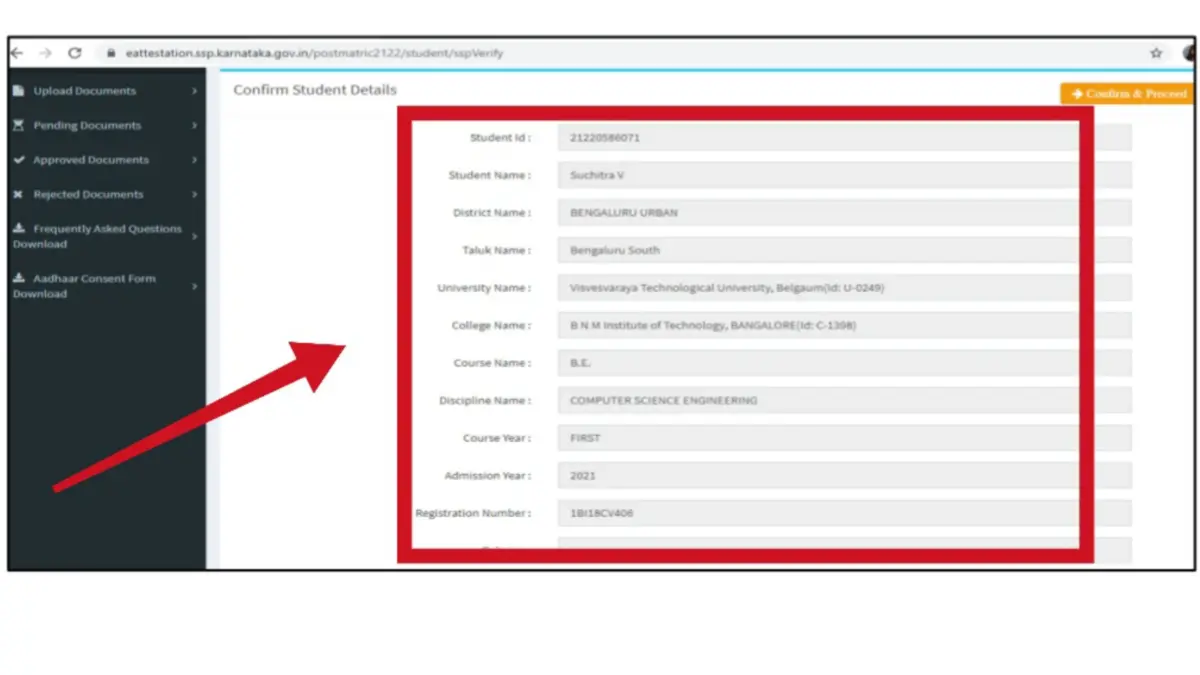
You do not need to fill anything here. Read the details carefully. If everything is correct, click “Confirm & Proceed.”
If you see any mistake, do not continue. First, log in to the main SSP portal and correct it. Then come back to the e-Attestation portal.
Step 3: Select and upload documents
On the dashboard, click “Upload E-Attestation Documents.”
A list of document types will open. Choose the document you want to upload. For example, PUC Marks Card. Now fill in the document details, such as
- PUC registration number
- Board name
- Year of passing
- Father’s and mother’s names
- Total marks and marks obtained
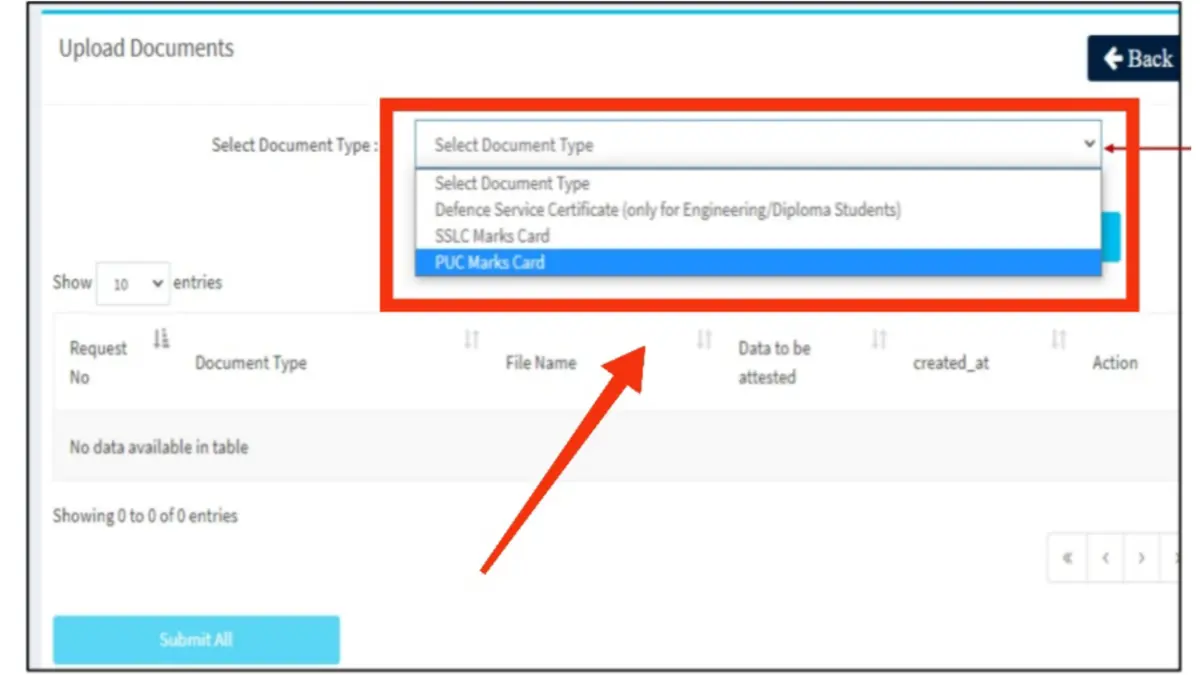
After that, click “Choose File.” Select the PDF file from your computer.
Step 4: Submit All Documents
Upload all required documents one by one. After uploading everything, click “Submit All.” Your documents will be sent to your college Nodal Officer for checking.
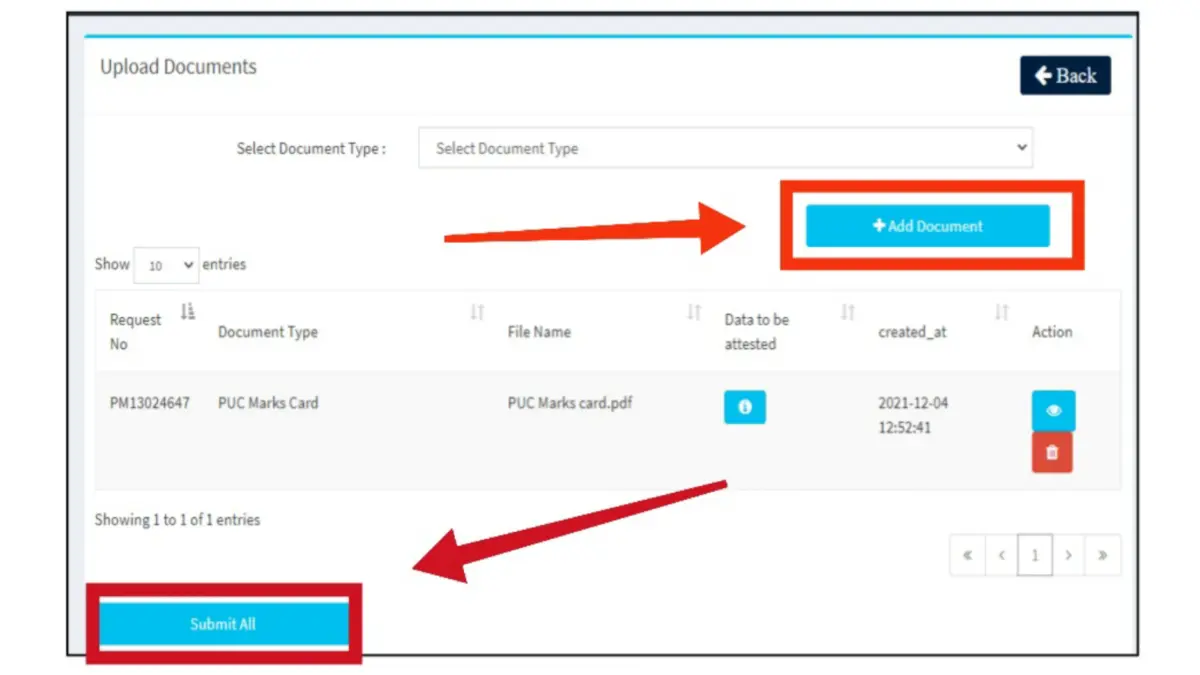
After Submission: You can check your document status anytime:
- Pending Documents – documents under verification
- Approved Documents – verified documents
- Rejected Documents – documents that need correction
That’s it. Just keep checking the portal for updates.
What Happens After You Upload Documents?
The Nodal Officer at your college will check the documents you uploaded. This usually takes a few days to 1-2 weeks, depending on the rush at the office.
For pending documents: If your document is still waiting to be checked, it will show in the “Pending Documents” menu. You can see the officer’s contact details there. If it is taking too much time, just contact them to ask about it.
For approved documents: Once your document is approved, you will get an e-Attestation ID. This ID is very important. You have to fill it in on your main SSP scholarship form. Please note it down somewhere safe.
For rejected documents: If a document is rejected, check the “Rejected Documents” section. The portal will tell you why—usually because the scan was blurry or some info was missing. Don’t worry, you can fix the mistake and upload it again.
A: E-KYC connects your Aadhaar info (like name, photo, and gender) to your scholarship application. This helps stop fraud. You cannot submit your SSP application without completing this step.
A: This means your bank account isn’t linked to Aadhaar for direct payments. Visit your bank right away. Ask for “Aadhaar Seeding” or “NPCI Mapping.” Linking the number isn’t enough.
A. Post-matric students need to enter their college or course data if the system fails to retrieve it on its own. (Students in ITI, PUC, and some polytechnics usually skip this as their data is auto-integrated.)
A: Go to the SSP e-Attestation Portal at eattestation.ssp.karnataka.gov.in. There, upload your original documents like mark cards and caste or income certificates. After that, take the physical originals to your college’s “e-Attestation Officer” for approval.
Not open
E kyc
I applied for the attestation, and I also verified, but I still did not get any verification or was declined. It’s just stuck in e-attestation, even if I ask the social welfare office and the department of college, no response till now
what is the last date for e-kyc
Please
Error server bussy
E attestation website is showing error .i complete 2 steps but step 3 is shot to e attestation protor
I want to apply for kyc
it shows for ekyc even when data uploaded successfully